
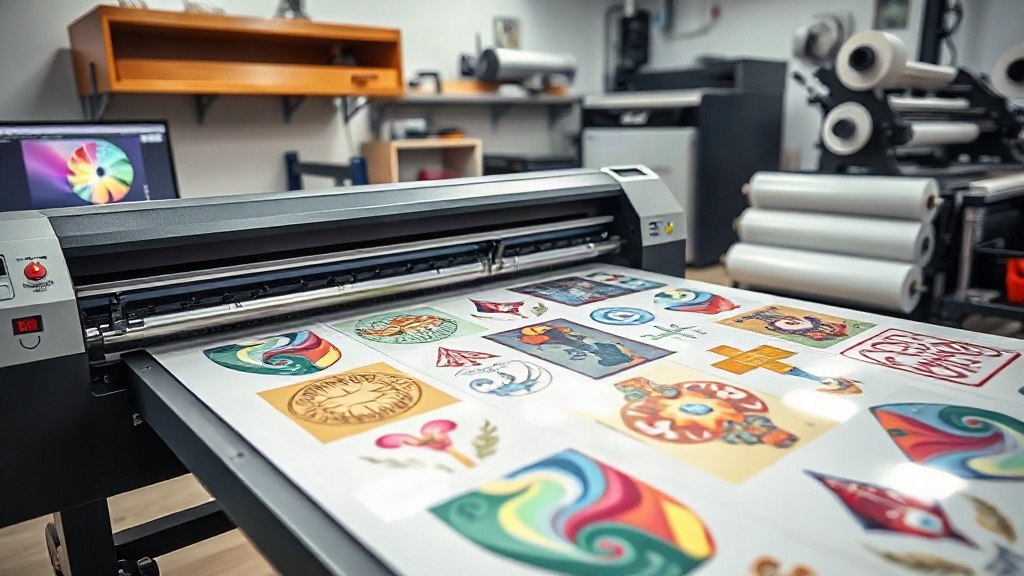
If you're in the custom apparel business, you've likely heard about DTF printing. But have you mastered the art of the DTF gangsheet? This powerful technique can dramatically improve your efficiency and bottom line. In this guide, we'll dive deep into what a DTF gangsheet is, why it matters, and how you can use it to take your printing to the next level. Whether you're a seasoned pro or just starting, understanding gangsheets is essential for maximizing your DTF printer's potential.
What is a DTF Gangsheet?
A DTF gangsheet is a single sheet of transfer film that contains multiple designs printed together. Instead of printing one design at a time, you arrange several designs on one large sheet, print them all at once, and then cut them apart after transfer. This method is a game-changer for efficiency, especially when you have many small orders or need to produce a variety of items quickly.
The term "gang" refers to grouping multiple items together. In DTF printing, a gangsheet allows you to gang up various designs, sizes, and even different customers' orders onto one sheet. This not only saves time but also reduces waste and cuts down on production costs.
Why Use a DTF Gangsheet?
There are several compelling reasons to incorporate gangsheets into your DTF printing workflow:
- Time Efficiency: Printing multiple designs in one pass saves significant time compared to printing each design separately. You load the film once, print once, and then apply the powder and cure once. This is especially beneficial for high-volume shops.
- Cost Savings: By maximizing the use of each sheet of film, you reduce waste. You also save on transfer powder and energy costs because you're running fewer print cycles.
- Consistency: When you print multiple designs on the same sheet, they all go through the same conditions (ink, powder, curing), ensuring consistent quality across all transfers.
- Organized Production: Gangsheets help you organize your workflow. You can group designs by order, customer, or garment type, making it easier to track and fulfill orders.
- Profitability: With faster production and lower costs, your profit margins improve. You can take on more orders without increasing your overhead.
In short, a DTF gangsheet is a smart way to work smarter, not harder.
How to Create a DTF Gangsheet
Creating a gangsheet involves several steps, from planning to printing. Here's a step-by-step guide to help you get started.
1. Plan Your Layout
Before you start, decide which designs you want to include. Consider the size of each design and how they will fit on your sheet. You'll need to use a design software like Photoshop, Illustrator, or a dedicated DTF rip software. Most DTF printers come with software that allows you to nest designs efficiently.
Remember to leave a small gap between designs (about 0.25 inches) to make cutting easier and to prevent ink bleeding. Also, consider the orientation of the designs; some may need to be rotated to fit better.
2. Prepare Your Artwork
Ensure all designs are in the correct format, typically PNG with transparent background. They should be sized appropriately for the intended garment. If you're printing white ink, make sure your designs have proper white underbase settings. Most DTF printers use CMYK plus white ink, so your artwork should be prepared accordingly.
It's also a good idea to mirror your designs if you're printing on transfer film that requires it. However, most DTF films are printed in reverse and then transferred, so check your printer's specifications.
3. Set Up the Printer
Load your DTF film into the printer. Make sure the film is clean and free of dust. Set the printer to the correct settings for your film type and desired resolution. Typically, a resolution of 1440x1440 dpi or higher is recommended for vibrant, detailed prints.
If you're using a roll-to-roll system, ensure the film is threaded correctly. For sheet-fed printers, place the sheet in the feed tray.
4. Print the Gangsheet
Send the job to the printer. The printer will lay down the CMYK inks first, followed by the white ink. Some printers have a separate white ink channel, while others use a single print head for all colors. After printing, the film will have a wet ink layer.
5. Apply Powder and Cure
While the ink is still wet, apply the DTF powder evenly over the printed area. Shake off excess powder. Then, cure the powder using a heat press or a curing oven. The powder melts and forms a flexible, durable layer that will bond to the fabric.
Follow the manufacturer's recommendations for curing temperature and time. Typically, curing is done at around 320°F (160°C) for 2-3 minutes.
6. Cut and Store
Once cured, the gangsheet is ready to be cut into individual transfers. Use scissors or a cutting machine. Store the transfers in a cool, dry place until ready to use.
Best Practices for DTF Gangsheets
To get the most out of your gangsheets, follow these best practices:
- Maximize Space: Nest designs tightly but leave enough room for cutting. Use software tools to auto-arrange designs for optimal use of film.
- Group Similar Jobs: If you have multiple orders with the same deadline, combine them into one gangsheet to save time.
- Test Your Settings: Before printing a full gangsheet, do a test print with a small design to ensure colors and white ink are correct.
- Keep Records: Note which designs were on which gangsheet, especially if you need to reprint later.
- Maintain Your Printer: Regular maintenance, such as cleaning print heads and checking ink levels, ensures consistent quality.
By following these tips, you'll become a gangsheet pro in no time.
Common Mistakes to Avoid
Even experienced printers make mistakes with gangsheets. Here are some pitfalls to watch out for:
- Overcrowding: Placing designs too close together can cause ink bleeding or make cutting difficult.
- Inconsistent White Ink: If the white ink layer is uneven, the colors may appear dull or the transfer may not adhere properly.
- Improper Curing: Under-curing leads to washing off; over-curing can make the transfer brittle. Always follow the powder and film instructions.
- Ignoring Film Orientation: Printing on the wrong side of the film will ruin the transfer.
- Not Enough Powder: If you don't apply enough powder, the transfer won't bond. But too much powder can cause a rough texture.
Avoiding these mistakes will save you time, money, and frustration.
Frequently Asked Questions
What is the difference between DTF and DTG?
DTF (Direct to Film) involves printing on a film, applying powder, and then transferring to fabric with heat. DTG (Direct to Garment) prints directly onto the garment. DTF works on more fabric types, including cotton, polyester, and blends, while DTG is primarily for cotton. DTF also allows for gangsheets, which DTG does not.
Can I use a DTF gangsheet for multiple shirts?
Absolutely. A DTF gangsheet is designed to hold multiple designs that can be cut and applied to different shirts. This is perfect for small batches or individualized orders.
How long does a DTF transfer last?
When properly applied and cared for, DTF transfers can last as long as the garment itself. They are durable and withstand repeated washing. Follow care instructions: wash inside out, avoid bleach, and tumble dry low.
Do I need special equipment to make DTF gangsheets?
You need a DTF printer, DTF film, DTF powder, and a heat press. A computer with design software is also necessary. No other special equipment is required, though a cutting machine can speed up the cutting process.
How do I price DTF gangsheet transfers?
Pricing depends on your costs (ink, film, powder, labor) and market rates. Generally, you can charge per design or per square inch. Gangsheets reduce your per-unit cost, so you can offer competitive prices while maintaining profit.
Mastering the DTF gangsheet is a journey, but the rewards are well worth it. With practice, you'll be able to produce high-quality transfers faster and more efficiently than ever. So fire up your printer, plan your layout, and start creating gangsheets that will impress your customers and boost your business.